Welcome, Guest. Please login or register.
Did you miss your activation email?

Login with username, password and session length

 
Advanced search

2505 Posts in 648 Topics- by 1314 Members - Latest Member: Saudi Arabia

eTicket CommunitySupportInstallation Help & Software Support (Moderators: jason, Hummdis)Topic: [SOLVED -- FINALLY] 1 under control buttons
Pages: [1] 2  All   Go Down
Print
Author Topic: [SOLVED -- FINALLY] 1 under control buttons  (Read 3800 times)
0 Members and 1 Guest are viewing this topic.
vtran4270
New Member
*

Karma: +0/-0
Offline Offline

Posts: 3


« on: November 21, 2008, 05:41:45 AM »

Hello,

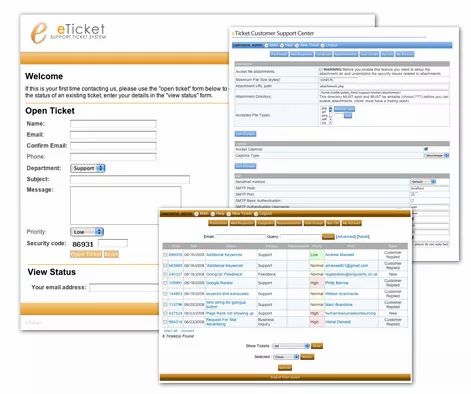
I installed this great application and currently testing it.  Everything works fine except for the number 1 display right under the control buttons (Preference, Database, Mail Responses) in the admin.php

Can anyone help me to remove this?  It's kinda sticking into my eys when I log into the pages.

Thanks again for this cool tool.
« Last Edit: September 25, 2009, 01:05:48 PM by Hummdis » Logged
beven
Project Manager/Developer
Global Moderator
Super Member
*****

Karma: +12/-4
Offline Offline

Posts: 804


WWW
« Reply #1 on: November 21, 2008, 09:56:15 PM »

Would you be able to show me a screen shot of this. Just paste it as a link.
Logged

Not to be confused with Bob Evans.
Ask not what eTicket community can do for you - ask what you can do for eTicket community.

Version 2 coming out shortly.
vtran4270
New Member
*

Karma: +0/-0
Offline Offline

Posts: 3


« Reply #2 on: November 24, 2008, 03:34:52 AM »

Thanks for reponding to my question.  Please check the image attached.

Thanks,
Logged
Hummdis
Moderator
Super Member
*****

Karma: +13/-0
Offline Offline

Posts: 558


WWW
« Reply #3 on: November 24, 2008, 05:27:54 AM »

ARRRGGGGHHHH!!  I've been seeing this too, but I though I was going crazy!!  It's only when you're given Administrative permissions and when the admin is logged in that it shows for me.

I've dug through the code all over the place for about four hours last week and couldn't figure it out at all.  I finally gave up since I found not hints or traces of what it's showing.

Posting my screenshot...

Logged

Don't PM me directly for help.  Post to the forums, that's what they are for after all.  PM's to me that request help will be ignored.

Hummdis Communications - Freelance Website Design & IT Consulting
vtran4270
New Member
*

Karma: +0/-0
Offline Offline

Posts: 3


« Reply #4 on: November 24, 2008, 09:33:17 AM »

I scanned through the files and have not find anything suggesting this error.  I wonder if this is the return value of a function that got printed out?

Thanks,
Vu
Logged
Hummdis
Moderator
Super Member
*****

Karma: +13/-0
Offline Offline

Posts: 558


WWW
« Reply #5 on: November 25, 2008, 11:22:18 AM »

I too have scanned....no, not scanned, searched!  I've gone a search of all the eTicket files for the number 1 using:

Code:
grep -r "1" ./

I looked at every single one (and there were a lot) but I couldn't for the life of me find out where this was coming from and since there were no other reports of this, I figured it was just my install.
Logged

Don't PM me directly for help.  Post to the forums, that's what they are for after all.  PM's to me that request help will be ignored.

Hummdis Communications - Freelance Website Design & IT Consulting
beven
Project Manager/Developer
Global Moderator
Super Member
*****

Karma: +12/-4
Offline Offline

Posts: 804


WWW
« Reply #6 on: December 06, 2008, 06:33:23 PM »

Sorry guys I can't see any of your screenshots I need a link to them. I'm thinking something in the language file vs the permissions is not set correct. Have you tried to click the 1 button and see where it takes you. I know that permissions are either 0 or 1. The 1 is probally the value of a certian permission.
Logged

Not to be confused with Bob Evans.
Ask not what eTicket community can do for you - ask what you can do for eTicket community.

Version 2 coming out shortly.
Hummdis
Moderator
Super Member
*****

Karma: +13/-0
Offline Offline

Posts: 558


WWW
« Reply #7 on: December 07, 2008, 09:48:35 AM »

It's actually not a link there therefore is not clickable.

I agree that it's the result of permissions, but I'm not sure where exactly it is coming from.  All that I know is that it only shows on our install when I'm (Administrator) logged in.  None of the other reps see this arbitrary "1" that appears.
Logged

Don't PM me directly for help.  Post to the forums, that's what they are for after all.  PM's to me that request help will be ignored.

Hummdis Communications - Freelance Website Design & IT Consulting
beven
Project Manager/Developer
Global Moderator
Super Member
*****

Karma: +12/-4
Offline Offline

Posts: 804


WWW
« Reply #8 on: March 28, 2009, 06:28:30 AM »

Sorry I have been out for the past couple months had to deal with some personal issues. I'm still looking into this if you guys could post a link to the screen shot. For some reason I cannot see any pictures you attach to the post.
Logged

Not to be confused with Bob Evans.
Ask not what eTicket community can do for you - ask what you can do for eTicket community.

Version 2 coming out shortly.
Hummdis
Moderator
Super Member
*****

Karma: +13/-0
Offline Offline

Posts: 558


WWW
« Reply #9 on: April 27, 2009, 05:14:42 PM »

Here's one:

It shows up in that section every-single-time and I just can't find it in the code.  I've trained my eyes to ignore it by now.

Logged

Don't PM me directly for help.  Post to the forums, that's what they are for after all.  PM's to me that request help will be ignored.

Hummdis Communications - Freelance Website Design & IT Consulting
baz
New Member
*

Karma: +0/-0
Offline Offline

Posts: 8


« Reply #10 on: June 10, 2009, 09:07:58 PM »

Got the same happening to me.  I know it's not polite to just bump, but erm. . .  well. .  bump! :)
Logged
Hummdis
Moderator
Super Member
*****

Karma: +13/-0
Offline Offline

Posts: 558


WWW
« Reply #11 on: June 11, 2009, 09:55:01 AM »

I believe this one has everyone scratching their head.
Logged

Don't PM me directly for help.  Post to the forums, that's what they are for after all.  PM's to me that request help will be ignored.

Hummdis Communications - Freelance Website Design & IT Consulting
Hummdis
Moderator
Super Member
*****

Karma: +13/-0
Offline Offline

Posts: 558


WWW
« Reply #12 on: September 25, 2009, 01:05:02 PM »

AH HA!!! Cheesy

I have FINALLY found where this damn thing is coming from!

In the 'inc/functions.php' file, right around line 620 (in mine anyway), there's this line:

Code: (php)
echo stripslashes($db_settings['last_result']);

Add two forward slashes to the line to comment it out and voila, it's gone!

Only took me the past two hours to find that...after all this time.
Logged

Don't PM me directly for help.  Post to the forums, that's what they are for after all.  PM's to me that request help will be ignored.

Hummdis Communications - Freelance Website Design & IT Consulting
baz
New Member
*

Karma: +0/-0
Offline Offline

Posts: 8


« Reply #13 on: September 27, 2009, 10:10:58 PM »

My, my.  That's excellent, thanks very much! :)
Logged
Hummdis
Moderator
Super Member
*****

Karma: +13/-0
Offline Offline

Posts: 558


WWW
« Reply #14 on: September 28, 2009, 06:16:29 AM »

Was it line 620 for you baz?

I'm just checking because I've got so many mods and changes that it may have been higher or lower than that on a more standard install.
Logged

Don't PM me directly for help.  Post to the forums, that's what they are for after all.  PM's to me that request help will be ignored.

Hummdis Communications - Freelance Website Design & IT Consulting
eTicket Community
   

 Logged
Pages: [1] 2  All   Go Up
Print
eTicket CommunitySupportInstallation Help & Software Support (Moderators: jason, Hummdis)Topic: [SOLVED -- FINALLY] 1 under control buttons
Jump to: