Welcome, Guest. Please login or register.
Did you miss your activation email?

Login with username, password and session length

 
Advanced search

2505 Posts in 648 Topics- by 1314 Members - Latest Member: Saudi Arabia

eTicket CommunityDevelopmentThemes (Moderators: jason, Hummdis)Topic: theming has changed please explain
Pages: [1]   Go Down
Print
Author Topic: theming has changed please explain  (Read 9404 times)
0 Members and 1 Guest are viewing this topic.
gabriel
New Member
*

Karma: +0/-0
Offline Offline

Posts: 6


« on: July 18, 2008, 06:42:05 AM »

where is the header located? where is the footer code?


I need my new updated migration theme to look like my previous theme

help would be appericiated, I wish it was setup like the installer theme.php  SO EASY that file to change.


Great job guys, code is looking fantastic Wink

Logged
Hummdis
Moderator
Super Member
*****

Karma: +13/-0
Offline Offline

Posts: 558


WWW
« Reply #1 on: July 18, 2008, 07:50:00 AM »

This post should actually be in the help and support section as it's for theme help and not theme development and design.


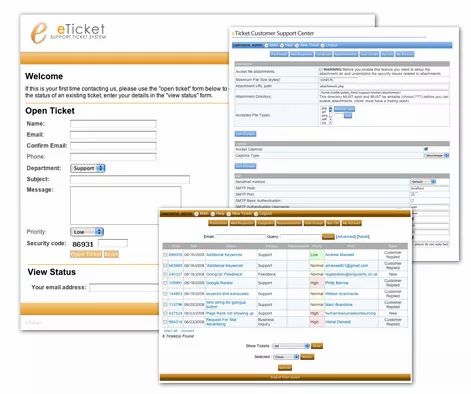
In any case, the new eTicket theme setup is as follows:

admin_login.html.php
This is the file that defines the layout for the Administrative login page "admin.php."  This needs to be modified separately.

eticket.css
Self explanatory.

index.php
This is the file that will redirect the user out of this folder should they try to view its contents.  Do not remove or change this file!

main.html.php
This is the file that displays the content of tickets just after the user logs in.  This file would be the Main page.

open_form.html.php
This is the format for the "New Ticket" form that displays on the home page of eTicket or when you click "New Ticket" when logged in.

rss.html.php
This is the RSS feed layout page.

search_form.html.php
This is the page that defines how the search form is displayed.  Changing this file will change the search fields.

theme.php
This file is the main file that brings the vast majority of the theme files together.  This file also contains the header and footer information as well.

user_login.html.php
This is the file that displays ther user login that normally displays at the bottom of the eTicket home page.

vars.html.php
This is the file that defines all of the variables used in the themes pages.  most changes CSS and other things are made in this file.

viewticket.html.php
This is the file that defines how tickets are displayed when being viewed.

All of the above files must be modified in some manner if you are making your own custom theme.  In doing so, you will need to be careful that you backup your original files to ensure that things are as they should be.

Once you make all of these changes, they will be compatible with future versions of eTicket as they are released.  You will not need to go through this process again.

Themes with eTicket 1.6.9 and prior are NOT compatible with eTicket 1.7.0 and later.
Logged

Don't PM me directly for help.  Post to the forums, that's what they are for after all.  PM's to me that request help will be ignored.

Hummdis Communications - Freelance Website Design & IT Consulting
beven
Project Manager/Developer
Global Moderator
Super Member
*****

Karma: +12/-4
Offline Offline

Posts: 804


WWW
« Reply #2 on: July 19, 2008, 10:44:32 AM »

Also if you are making a custom theme copy the /themes/eticket to something like /themes/yourtheme that way they will not get overwritten on an upgrade.
Logged

Not to be confused with Bob Evans.
Ask not what eTicket community can do for you - ask what you can do for eTicket community.

Version 2 coming out shortly.
eTicket Community
   

 Logged
Pages: [1]   Go Up
Print
eTicket CommunityDevelopmentThemes (Moderators: jason, Hummdis)Topic: theming has changed please explain
Jump to: